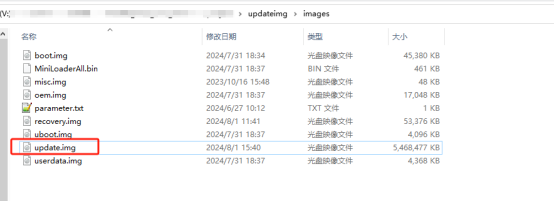
Repack Root Filesystem After Export
Environment: Ubuntu 20.04 or later, flashing tool RKDevTool_Release_vx.xx
Ubuntu setup
First install the mkfs.ext4 tool:
sudo apt install e2fsprogs
sudo apt-get install qemu-user-static
1. Extract the update.img image
This is usually the complete firmware .img we provide, which can be flashed directly.
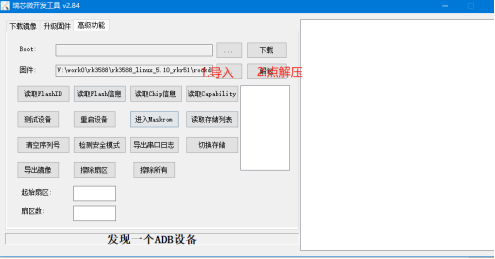
The extracted files are usually under RKDevTool_Release_v2.84\Output\Android\.
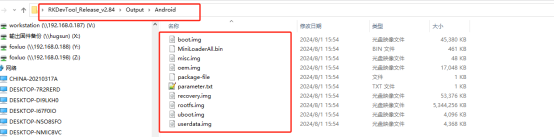
2. Copy files to Ubuntu
Copy all files from RKDevTool_Release_v2.84\Output\Android\ to the \updateimg\images\ directory on Ubuntu. Also copy parameter.txt and MiniLoaderAll.bin from RKDevTool_Release_v2.84\Output\.
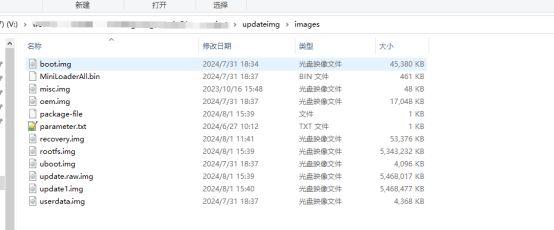
If prompted to overwrite, select "Overwrite all".
3. Export the RK3588 root filesystem
Pack the root filesystem:
1. cd /
2. sudo tar -czf rootfs.tar.gz --exclude=/proc --exclude=/sys --exclude=/dev/pts --exclude=/run --exclude=/rootfs.tar.gz --exclude=/mnt --exclude=/media /
- Wait about 5–20 minutes, then copy
rootfs.tar.gzto the\updateimgdirectory on Ubuntu usingadb pullor a USB drive.
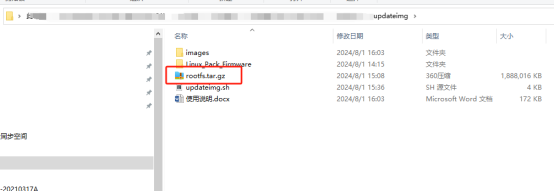
4. Generate the flashable firmware
Run ./updateimg.

5. New firmware location
The new firmware is under updateimg\images\.